
Need help?
You have come to the right place!
Please contact us (see below for contact information) and we’ll get back you you as soon as possible.
Contact 8paint Customer Support
How do I contact 8paint customer service?
The quickest way to reach us is to send an email to:
As a rule, my team tries to reply to all questions within a business day. They often get back to you on the same day.
I know a phone call might be quicker, but here’s why we prefer email:
- We can thoroughly research your issue at hand and get back to you with a more complete answer, AND you can refer to it again if you need to.
- Email helps our customer service team figure out most common questions and in the end, helps us improve our course and website when we see certain patterns arising.
- We have team members that can monitor the help emails, so that response time is more expedient that we can via phone.
I’m not receiving 8paint emails...
There could be a few reasons for this. Below are some common solutions:
If you have a gmail account, our email can wind up in your Promotions Folder:
Why is My Email Delivering to the Promotions Tab?
Gmail moves marketing and bulk emails, such as deals, offers, and other promotional messages, into the Promotions tab. Emails sent through 8paint can typically end up here because we use an Email Service Provider (ESP).
Getting Emails Delivered to the Primary Tab
Gmail’s Primary tab includes all emails from people you know and any other messages that don’t appear in other tabs. Getting your email to land in a contact’s Primary tab is naturally hard to control — it’s all up to the recipient!
Moving an Email to the Primary Tab
Your contacts may decide to move you into their Primary tab by clicking and dragging one of your emails from the Promotions tab. By doing so, all future emails from you will be delivered to the Primary tab.
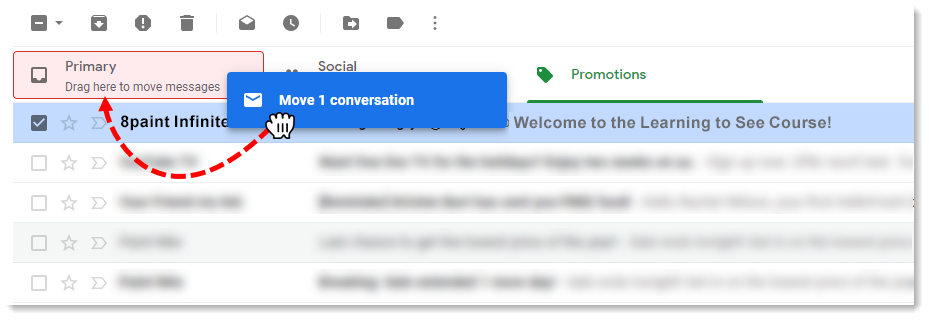
Add our email to your contacts list
Here are some things you can do to help your emails land in the Primary tab or your inbox:
Add theteam@8paint address to your contact list. In Gmail, this can be done by hovering over the senders name in the top-left corner of the email, and then clicking “Add to Contacts.” Emails from a subscriber’s contacts always go to the Primary inbox. In most other email applications, such as Apple Mail, adding our name and email address to your contacts list will help to avoid our emails going to the spam folder.
Navigating the Website
How do I Log In and get to the Classes?
How to I Upload my Profile Image?
How do I get Notifications on Comments?
CLICK HERE to open and download the PDF instructions on how to get notifications if someone replies to your comment and/or to subscribe to lesson comments.
How to I access Partial Payments?
We use Partial.ly as our processor for partial payments. When and if you purchased the course through the payment program, Partial.ly automatically creates your customer account using the information you provided when you filled out your order information.
You should have received an email “Partial.ly account created” from Partial.ly where you will need to reset your password so that you can log in to your customer account and review your payments.
Click HERE to read the Partial.ly support FAQ
If you have other questions regarding the payment plan with us, please contact us at
Learning to See Course Questions
I can’t access all the Classes, help!
If you’re trying to access class content that hasn’t been released yet, hold tight!
Each class is scheduled for release as a specific week date once you have joined the course. If the content is released and you are still seeing that message, please try logging out, clearing your browser’s cache, and logging back in. If you are still having trouble, write us as